Mint Design System
Designing the foundation for a product used by more than half a billion people
Industry
Fintech
Client
PhonePe
Role
Lead Product Designer
Year
2024-2025
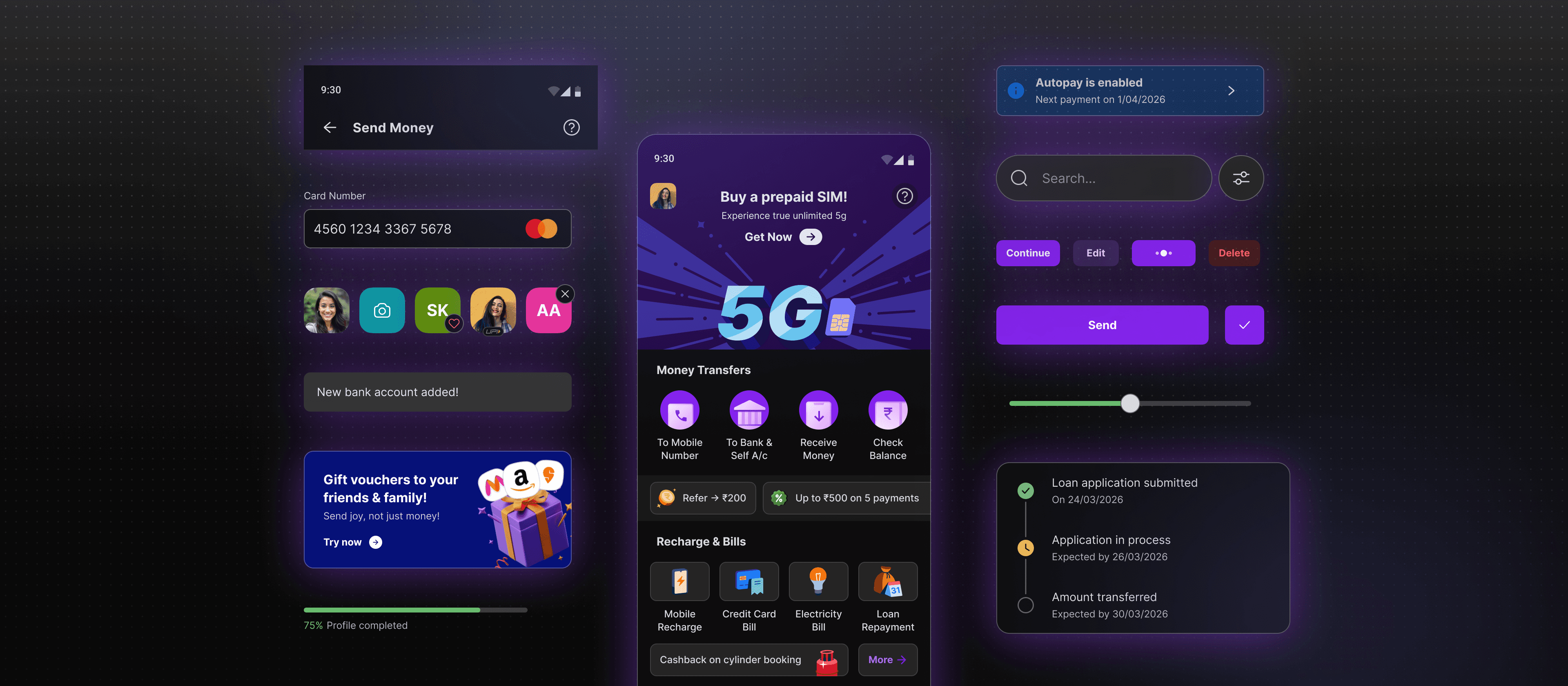
PhonePe processes over $1.6 trillion in transactions a year. Every tap, every payment confirmation, every error state across the consumer app is touched by a design system. In 2024, that app went through its most significant redesign in years: new visual direction, new component architecture, a six-month deadline. Mint was the foundation that made it shippable.
Built to replace a fragmented, plugin-dependent workflow, Mint gave 25 designers and hundreds of engineers a shared language for the first time: native Figma Variables, a versioned token pipeline, and dark mode theming that actually worked at scale. Token adoption is enforced end to end. Nothing untokenised reaches production.
Why the existing system couldn't support the revamp
PhonePe already had a design system with a mature token architecture and a working code counterpart. But with the visual language changing from the ground up, components and styles needed to be rebuilt anyway. The revamp was the right moment to fix the workflow too, and we took it.
The system was built entirely around Token Studio, a plugin that required designers to run it as a separate tool alongside Figma just to apply colors, spacing, and corner radii. Tokens existed in the plugin, not in Figma itself. This created three compounding problems: high onboarding overhead for every designer, slow performance against PhonePe's large token set, and most consequentially, a team that never learned to speak in token names. Because tokens had no presence in Figma itself, the interface only showed raw values: hex codes, pixel numbers. That became the default language between designers and developers.
That last problem became acute with dark mode. Implementing dark mode correctly requires everyone speaking the same token language. With raw values as the common currency, dark mode handoffs were error-prone and slow. A significant liability for a product about to undergo a full redesign.
The revamp created a hard forcing function. Tokens and core components had to ship before feature teams could build. The system had to be right.
Key decisions
Moving fully to Figma Variables
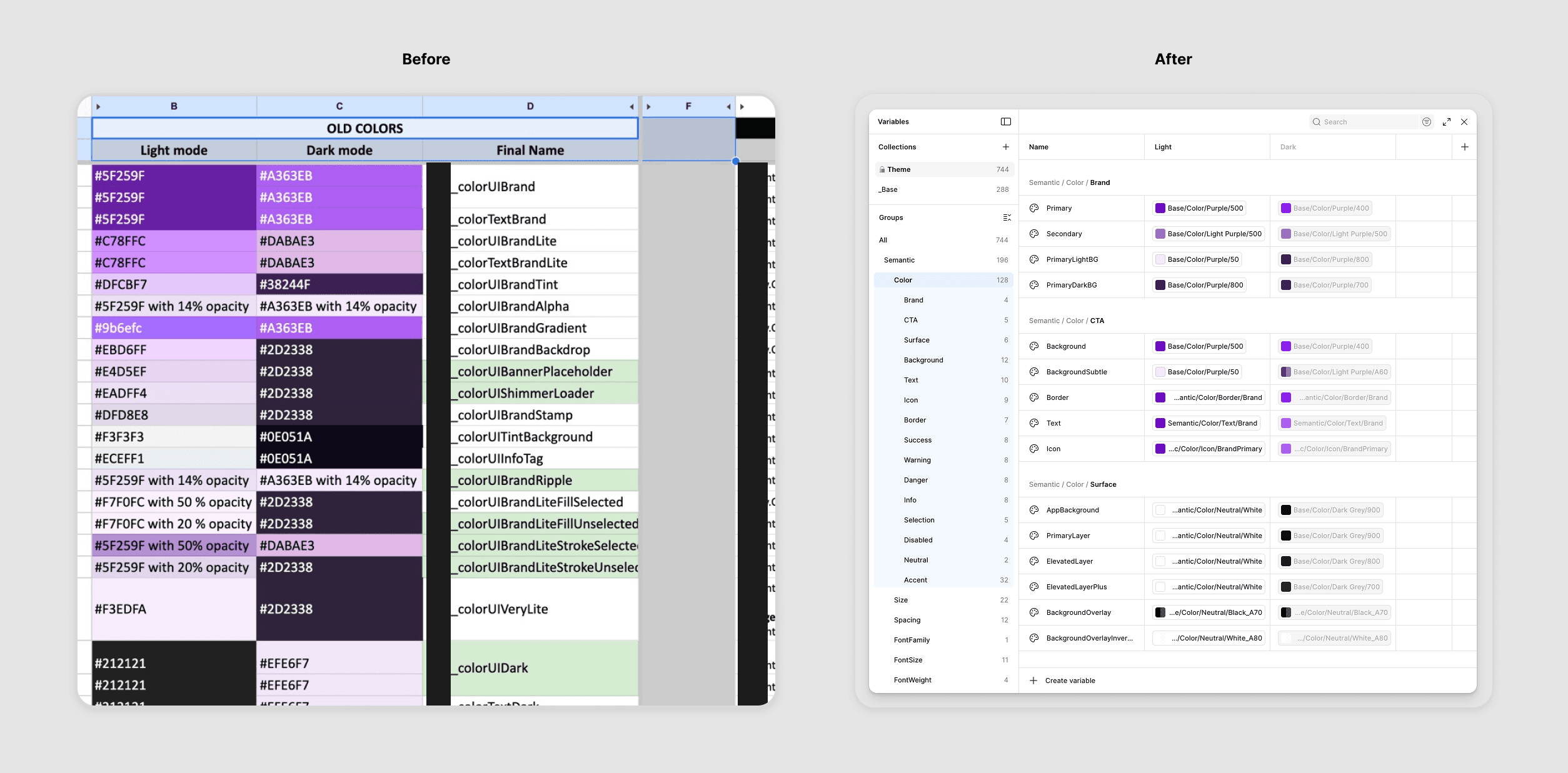
From manual color mapping spreadsheets to native Figma Variables — the token migration that changed how the team communicates
The decision to migrate from Token Studio to Figma's native Variables wasn't just a tooling preference. It was about collapsing the gap between design and engineering communication.
With Variables, tokens live inside Figma. Designers apply them naturally as part of their normal workflow, without switching tools. Token names become visible and searchable in the interface, which means designers start using them, and when designers speak in token names, so do their handoffs to developers.
The migration itself happened in about a week, timed deliberately with the start of the revamp when the consumer design team (around 25 designers) was focused on new work and older files weren't being actively used. Rather than migrating legacy files, we took advantage of the clean slate the revamp provided.
Preserving the existing token architecture
One decision that could have gone differently: we chose not to refactor the token architecture on the code side when rebuilding Mint in Figma.The existing three-tier structure (base primitives → semantic → component) was already in production and working well for engineering. Rebuilding it would have meant significant refactoring cost for limited benefit, so we mirrored it in Figma Variables and kept both sides in sync.
Semantic tokens are designed to be generic and reusable across contexts. Feature teams have highly specific needs that don't fit that model, and at PhonePe, new features and campaigns ship constantly. Forcing feature-specific tokens into the semantic layer would have diluted its purpose. So we introduced a Features subgroup as a natural extension: a dedicated, sandboxed layer that kept the core architecture clean while giving product teams a predictable place to work.
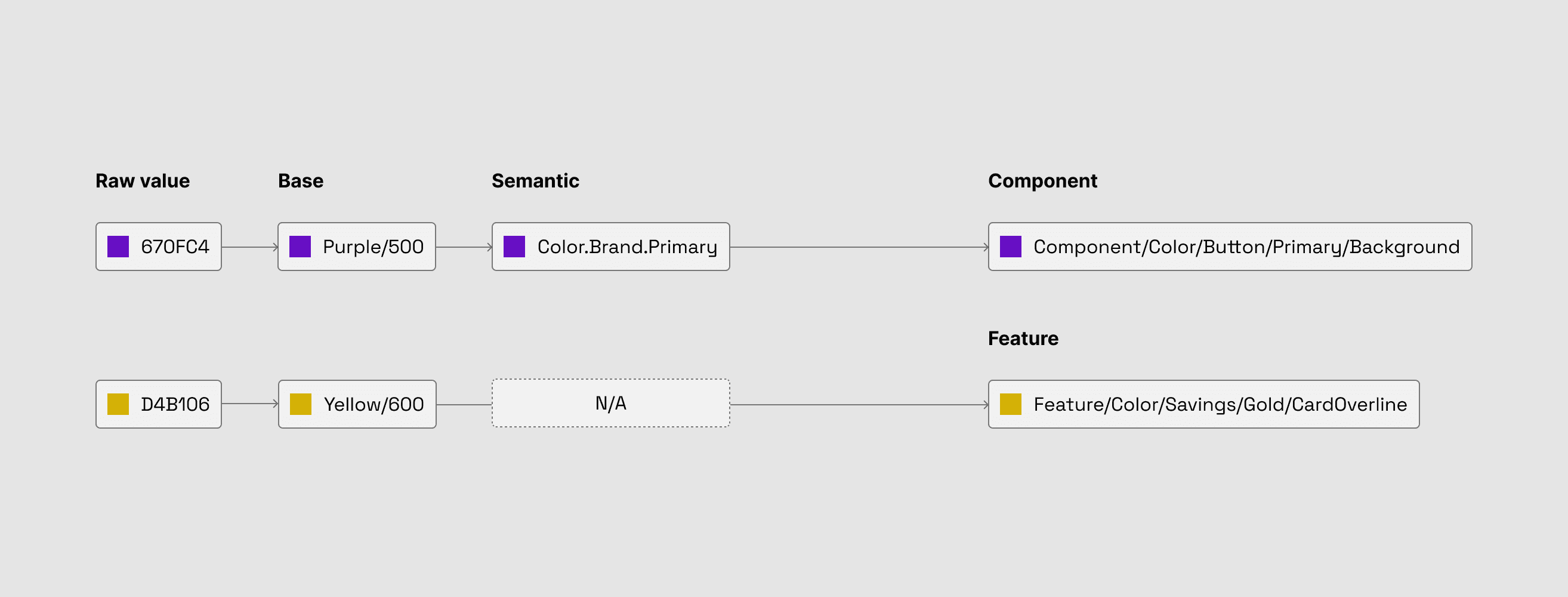
Mint's token architecture: a three-tier system with a dedicated feature layer for product-specific needs
Theming and dark mode via Variables
Dark mode had existed in PhonePe's consumer app before, but it needed to be rebuilt from scratch to match the new visual direction. Figma Variables made this significantly faster. By structuring semantic tokens to reference different primitive values depending on the active theme, switching between light and dark mode in design became a single toggle rather than a manual re-application of values.
More importantly, it meant design and engineering were using the same semantic token names for both themes. The dark mode errors that came from raw-value communication largely disappeared.
A git-based token handoff
The previous token handoff process was fragile by design: the DS team would export a JSON file from Token Studio and email it to the engineering team, who would then run scripts to generate iOS and Android native tokens. Each handoff was a manual, undocumented transfer with no version history.
When we moved to Variables, we adopted the DTCG (Design Token Community Group) standard for token structure and used a third-party plugin to export JSON from Figma. Initially, we versioned the exported files and stored them in a shared Google Drive folder. Over time, we moved to a dedicated GitLab repository, committing token changes on a weekly cadence with detailed changelogs.
The shift mattered beyond process tidiness. With a versioned repo, engineers could consume tokens directly into their pipeline without waiting on a manual transfer. Changes were traceable. Trust between design and engineering around token accuracy went up noticeably.
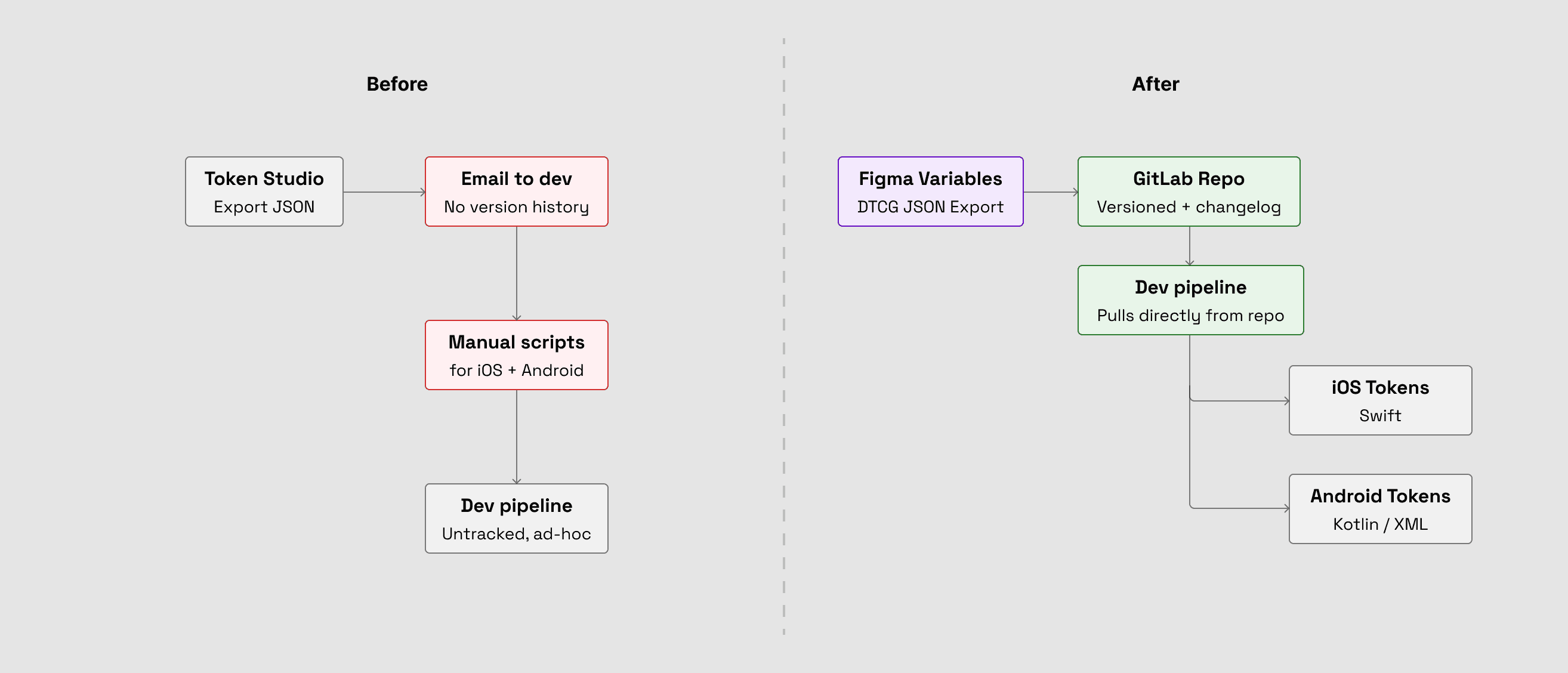
Token handoff before and after — from manual email transfers to a versioned GitLab pipeline
Making the system legible: Mint Docs
A design system is only as good as its adoption. Getting tokens and components into Figma was one problem. Getting 25 designers and a much larger engineering org to actually use them correctly was another.
We decided early on that a Figma library and a Slack channel weren't enough. Knowledge about the system was scattered across Google Docs, email threads, and individual heads. Without a single place to find answers, designers would either guess or ask the DS team directly, neither of which scales. So we built Mint Docs, a dedicated documentation site covering component usage, token guidelines, UI patterns, motion, and UX copy.
The intent wasn't comprehensiveness. It was making the system the path of least resistance, so that using Mint correctly was always easier than working around it. Read more about how we built it →
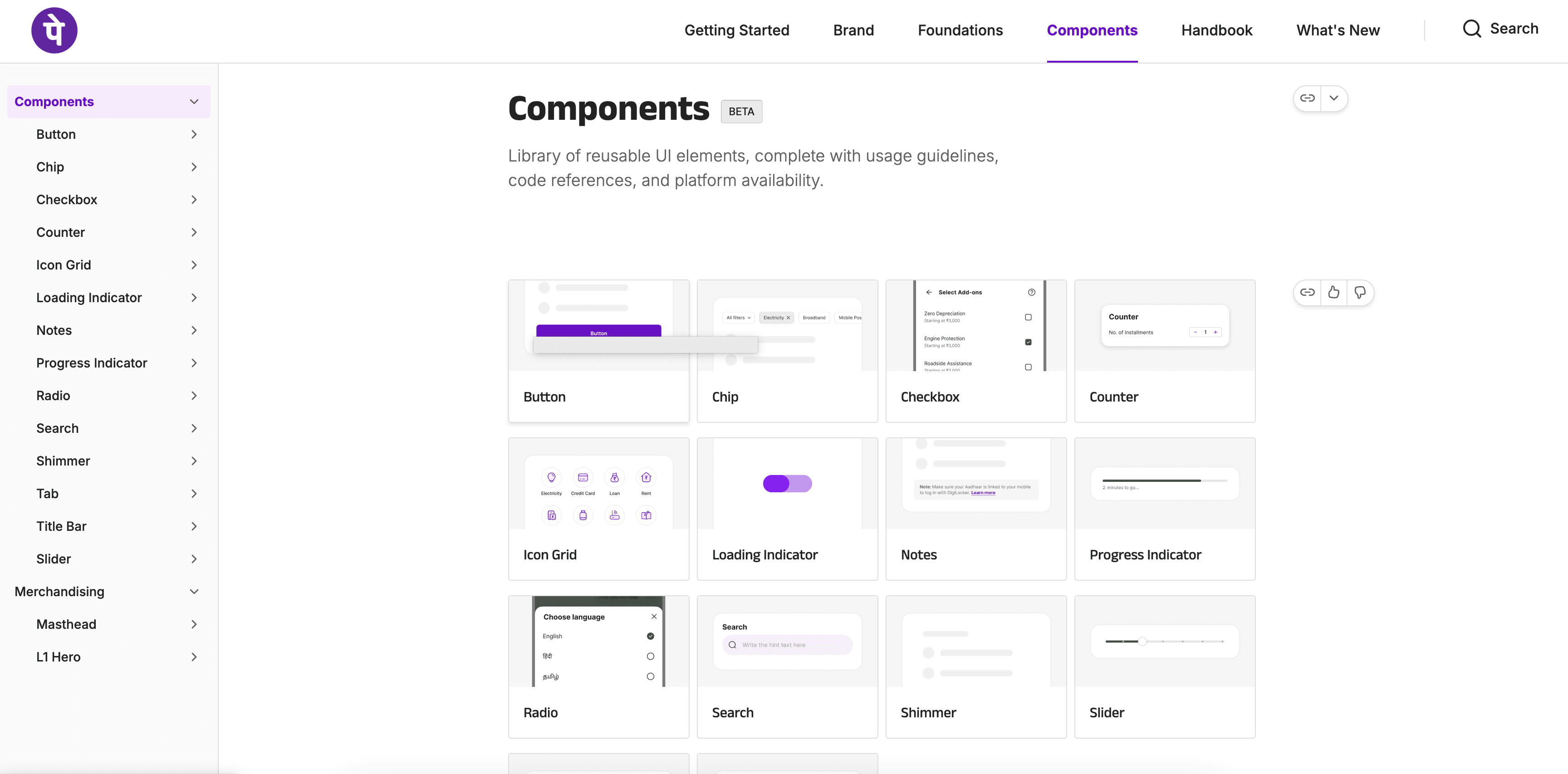
The components section of Mint Docs — usage guidelines, code references, and platform availability in one place
Component spotlight
The Title Bar
The Title Bar lives on every screen, which means it has to work in every context: transparent backgrounds, image mastheads, dark and light surfaces, theme changes mid-scroll. Getting it wrong anywhere is immediately visible to users.
The component's scope grew as we designed it. What started as basic navigation expanded to support multiple surfaces and hero mastheads. An early option considered was using the OS native title bar. iOS and Android both provide one, but that would have meant maintaining two separate versions in both design and code, and designers would have had to create platform-specific variants for individual features as needed. A custom component was the only path that could work consistently across the app.
The core challenge was legibility over unpredictable backgrounds. When the Title Bar sits over images, illustrations, or video, icon contrast can't be left to chance. The solution was to stop trying to make the component adapt dynamically, and instead make the variants explicit. Each variant has fixed icon and text treatment. The "On Image" variant always uses light icons inside a dark container, making them legible regardless of what's underneath. No guessing, no runtime adaptation.
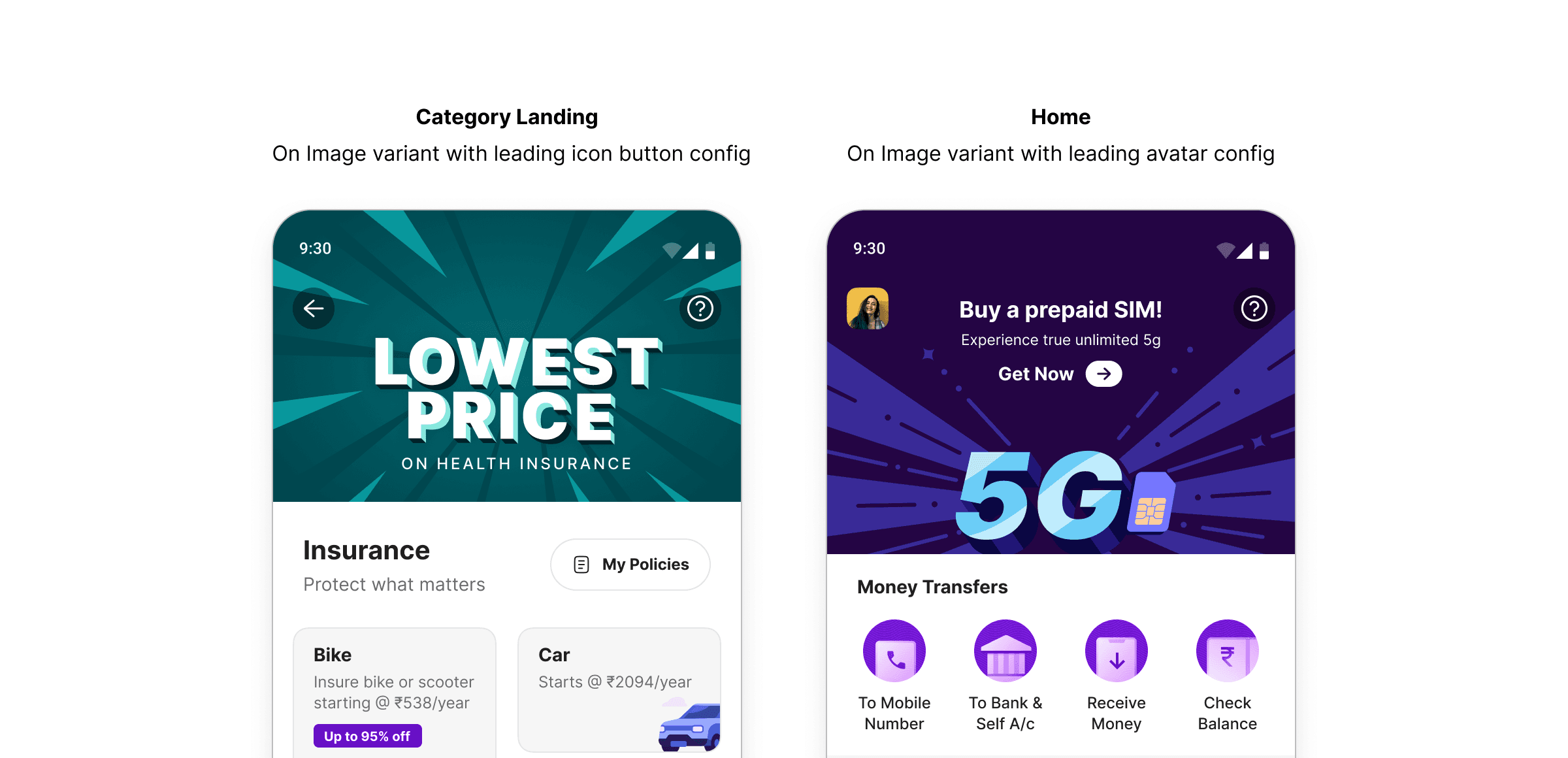
On Image variant in use: the dark icon container ensures legibility regardless of what's behind it
The same thinking applied to surface variants. Rather than building a single adaptive variant to handle all surface types, we kept "On Light Surface" and "On Dark Surface" separate. A unified variant was explored, but the dev complexity made it impractical. Two explicit variants was simpler to build, simpler to maintain, and simpler to consume.
The component shipped with 6 variants in total: On Image, Default, Default Transparent, On Light Surface, On Dark Surface, and On Scroll.
The On Scroll variant is worth calling out specifically. Built in close collaboration with the motion team to get the timing and animation right, it handles its own transition from transparent to filled at the component level. Before this, teams had to build and choreograph that scroll animation differently for every screen. With the variant handling it natively, that coordination cost disappeared entirely.
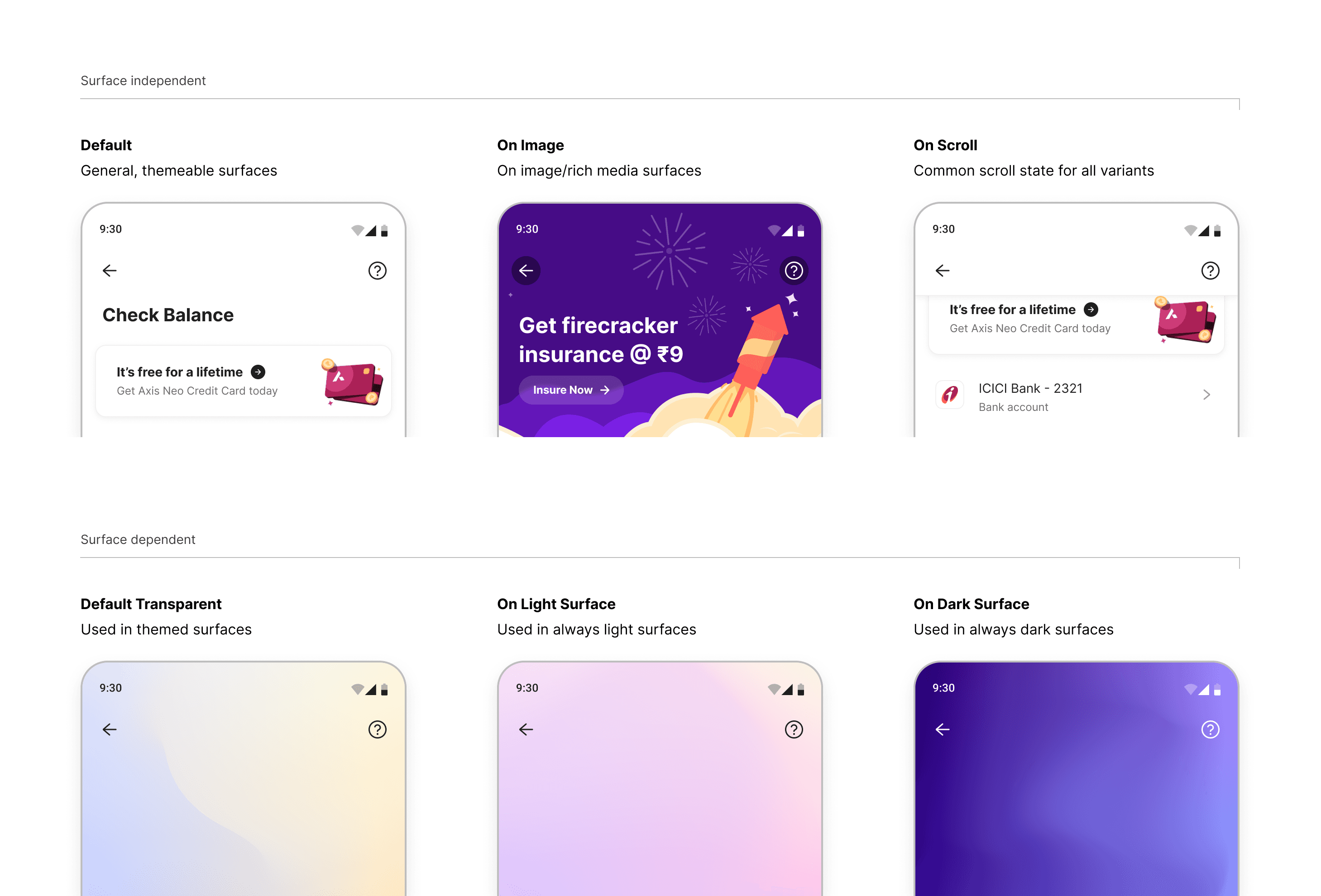
Title Bar variants grouped by surface type: three that adapt to any theme, three that are fixed to their surface
Naming was a deliberate choice throughout. Behaviour-based names like "On Image" and "On Scroll" rather than abstract ones like "Primary" or "Overlay" meant designers and developers could pick the right variant without opening the documentation. At PhonePe's scale, that kind of obviousness is a necessity.
How it held up
When the revamp kicked off, Mint's foundational layer (tokens and core components) was the first deliverable, not a parallel workstream. Feature teams couldn't build until the foundation was in place. This sequencing, while it added pressure to the DS team early on, meant that by the time product teams started building out revamped features, they had a stable system to work from.
Token adoption is enforced at every stage. Designers work within the token system and raise requests for any gaps. The DS team reviews and adds as needed before handoff. Nothing untokenised reaches production. That norm didn't happen by accident; it was established during the revamp when everyone was building on Mint from day one.
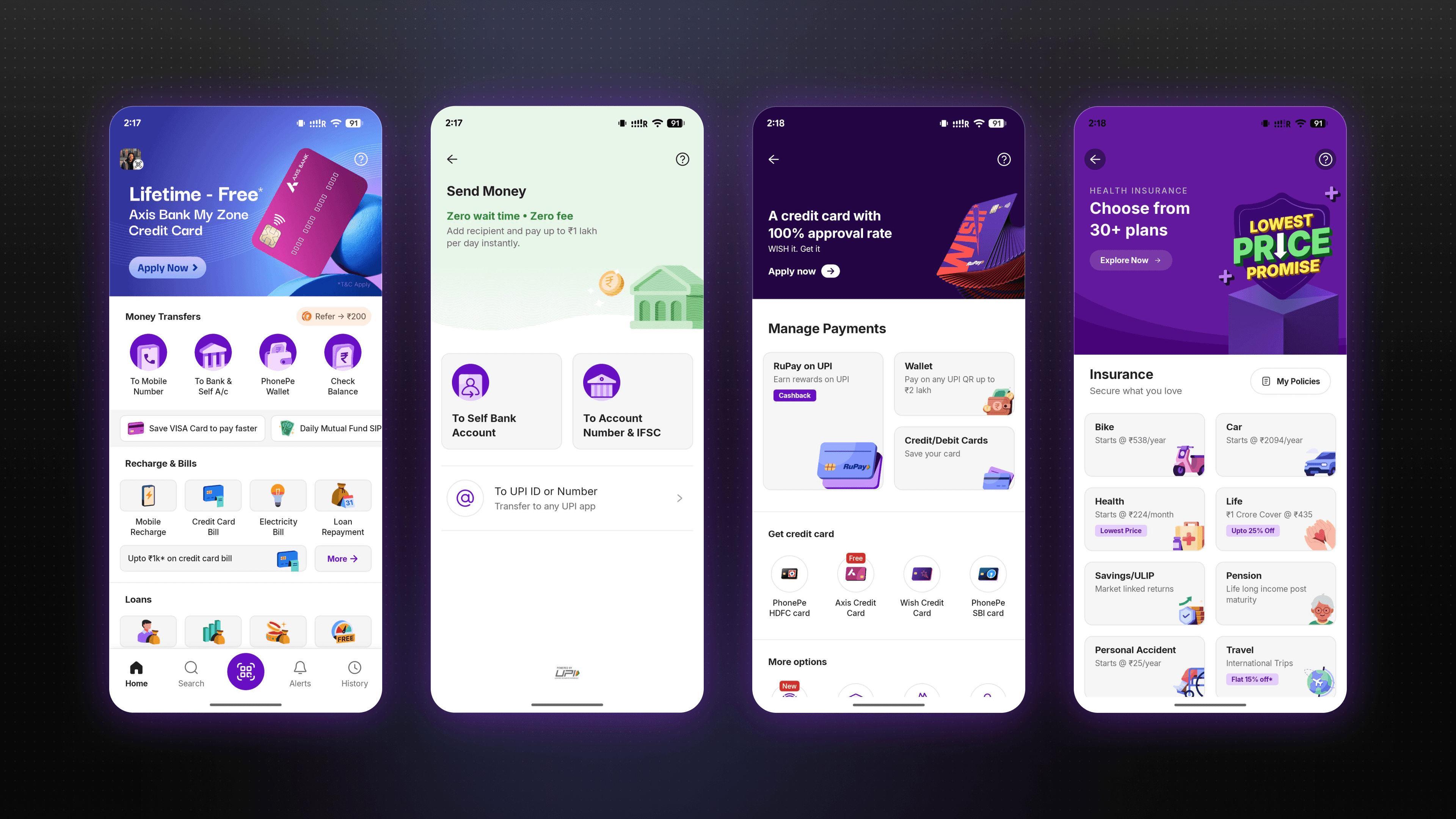
Four surfaces, one system — Mint components in the shipped PhonePe consumer app
Impact
50%
Reduction in time to implement a new screen or feature
100%
Token compliance across design and engineering
2x
Faster dark mode implementation after Variables migration
100%
Consumer product teams building on Mint by end of revamp
Reflection
If I were starting Mint from scratch today, I'd push for more architectural separation between the Figma token structure and the engineering implementation earlier in the process. Mirroring the existing code architecture was the right call for the revamp timeline. It kept refactoring cost down and got the system into production fast. But tighter coupling means changes on either side now require more coordination than they should. It's a tradeoff I'd make again given the constraints, but one I'd try to design out sooner on the next system.
The bigger lesson was about what actually drives adoption. The tooling decisions mattered, but what made Mint stick was the norm we established during the revamp: every feature built on the system from day one, with no exceptions. By the time the revamp shipped, Mint wasn't something teams used because they were asked to. It was just how PhonePe builds.
That shift in culture is what I'm most proud of. Mint established a shared practice and raised the floor of quality across every feature that followed. The system is still the foundation the consumer app is built on today.